> ## Documentation Index
> Fetch the complete documentation index at: https://docs.vervecopilot.com/llms.txt
> Use this file to discover all available pages before exploring further.
# Mock Interview
> Practice interviews with an AI recruiter using industry-specific question banks, custom questions, or LinkedIn job descriptions.
## Overview
Mock Interview is a realistic interview simulation where an AI recruiter asks you questions and you practice responding in real-time. It's the perfect way to prepare for upcoming interviews, refine your answers, and build confidence before the real thing.
**Why Use Mock Interview:**
* **Realistic Practice** - Experience an interview simulation with an AI recruiter
* **Industry-Specific Questions** - Choose from question banks tailored to your field
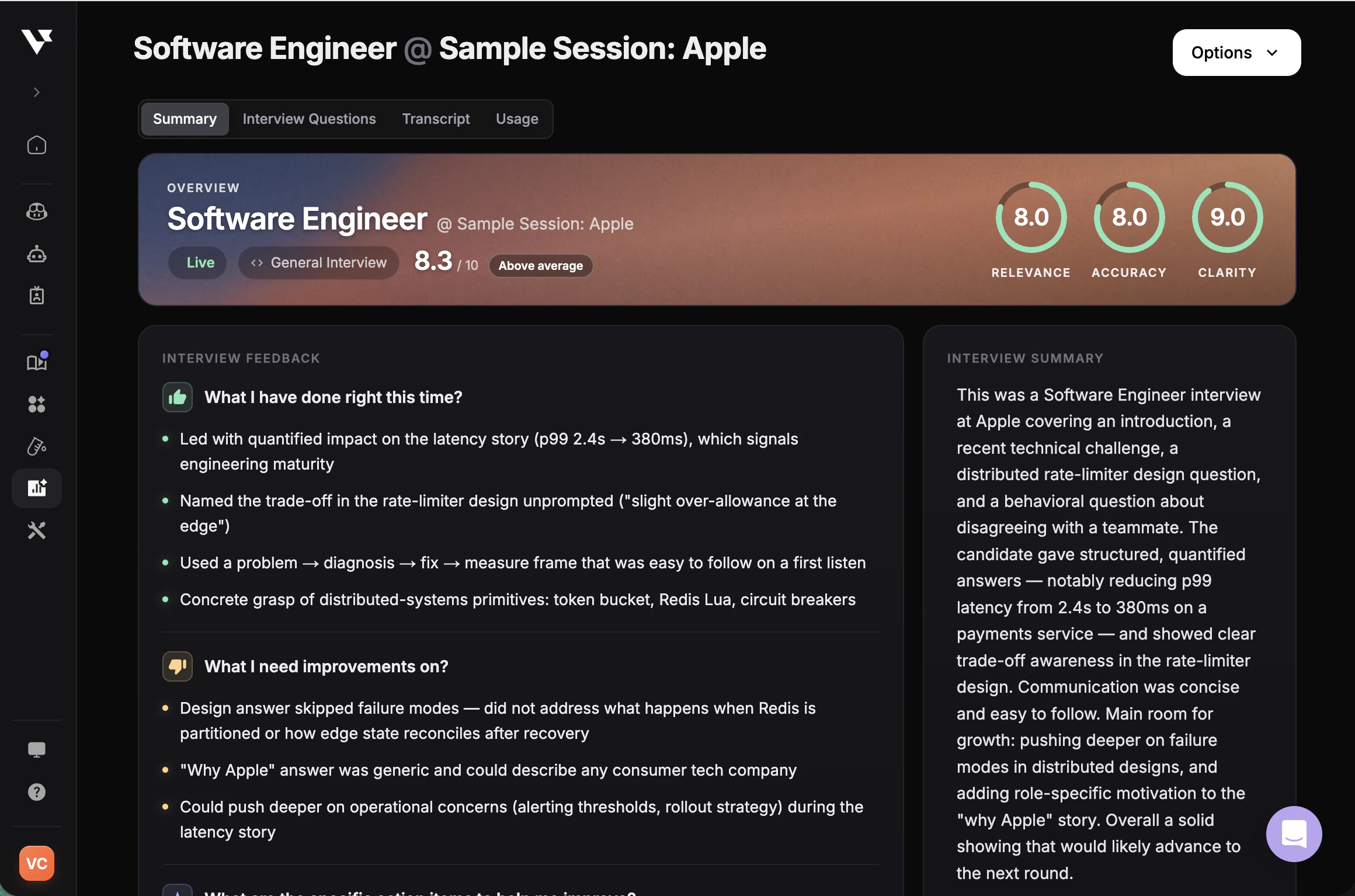
* **Personalized Feedback** - Get scored interview reports based on your interview profile
* **Interview Copilot Assistance** - Receive real-time tips and guidance during practice
 ***
## How to Start a Mock Interview
Navigate to [**Mock Interview**](https://www.app.vervecopilot.com/mock) in your dashboard.
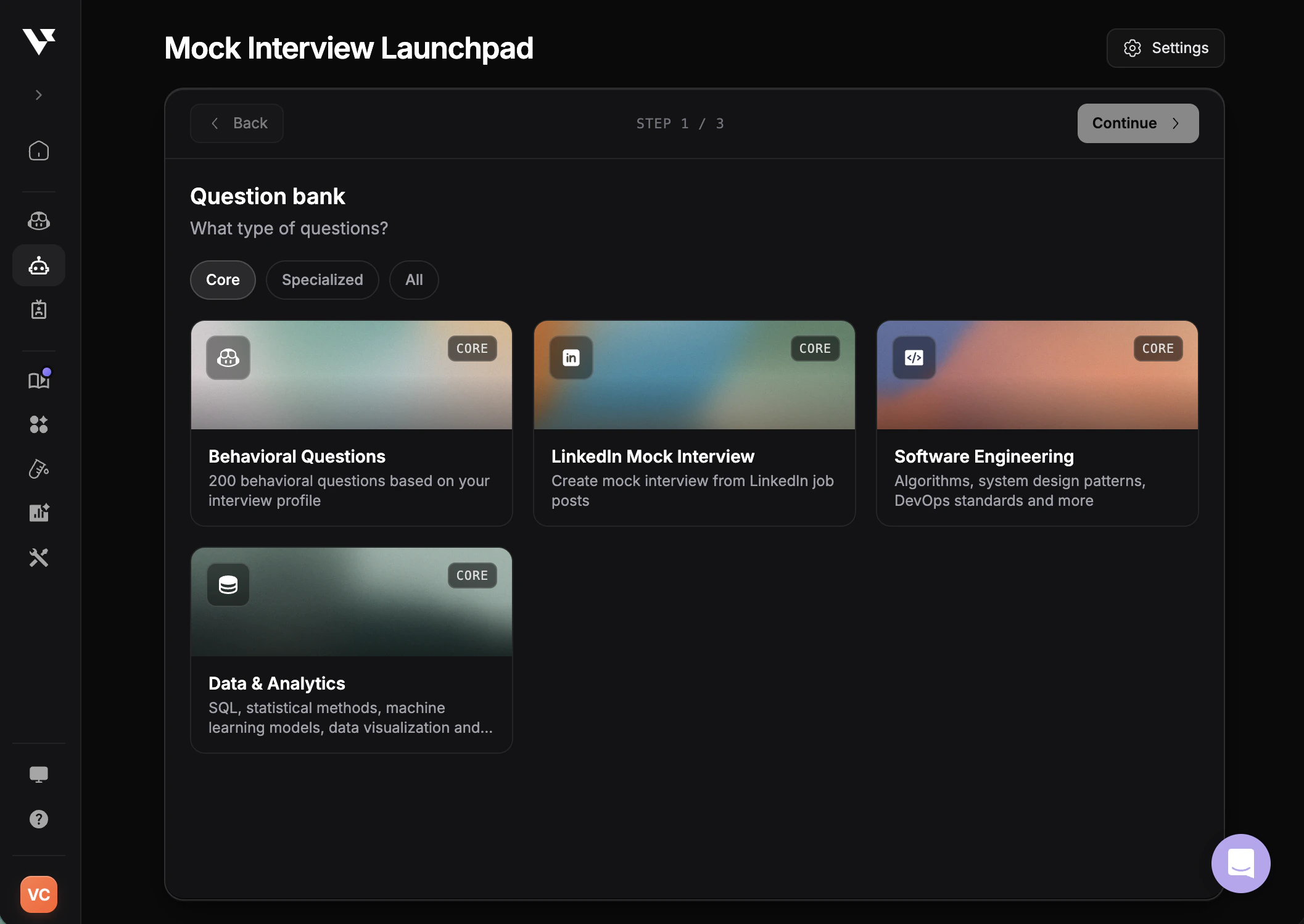
Choose the type of questions you want to practice. The question bank determines the interview type, industry, and job role for your mock session.
Choose an interview profile to enable personalized guidance during the mock and generate a tailored interview report afterward.
Review your settings and click **Start** to begin your mock interview session.
***
## How to Start a Mock Interview
Navigate to [**Mock Interview**](https://www.app.vervecopilot.com/mock) in your dashboard.
Choose the type of questions you want to practice. The question bank determines the interview type, industry, and job role for your mock session.
Choose an interview profile to enable personalized guidance during the mock and generate a tailored interview report afterward.
Review your settings and click **Start** to begin your mock interview session.
 ***
## Question Banks
Choose from a variety of question banks based on your interview needs:
200 behavioral questions tailored to your interview profile. Perfect for practicing STAR-method responses and common situational questions like "Tell me about a time when..."
Select questions from your [Question Bank](/features/question-bank) and practice with the AI recruiter. Ideal for company-specific preparation or practicing questions you've collected.
Practice with questions generated from a job description. Use [LinkedIn Mock Interview](/guides/linkedin-job-mock-interview) in Tools to generate and save questions to your question bank first.
Algorithms, System Design Patterns, DevOps Standards, and more technical questions for software engineering roles.
Financial Theories and Principles, Investment Strategies, Financial Analysis, and more for finance interviews.
SQL, Statistical Methods, Machine Learning Models, Data Visualization, and more for data-focused roles.
Product Lifecycles, Market Research, Agile Methodologies, and more for PM interviews.
Marketing Strategies, Digital Marketing, Brand Management, and more for marketing roles.
Case Studies, Business Strategy, Market Analysis, and more for consulting interviews.
Network Security, Threat Analysis, Security Architecture, and more for cybersecurity positions.
***
## Understanding Interview Profiles in Mock Interview
Your selected interview profile allows Interview Copilot to provide personalized guidance during the mock session. It also enables more accurate scoring in your interview report by evaluating your responses against your background and the role you're preparing for.
Set up your interview profile with your resume and job details
***
## In-Session Features
***
## Question Banks
Choose from a variety of question banks based on your interview needs:
200 behavioral questions tailored to your interview profile. Perfect for practicing STAR-method responses and common situational questions like "Tell me about a time when..."
Select questions from your [Question Bank](/features/question-bank) and practice with the AI recruiter. Ideal for company-specific preparation or practicing questions you've collected.
Practice with questions generated from a job description. Use [LinkedIn Mock Interview](/guides/linkedin-job-mock-interview) in Tools to generate and save questions to your question bank first.
Algorithms, System Design Patterns, DevOps Standards, and more technical questions for software engineering roles.
Financial Theories and Principles, Investment Strategies, Financial Analysis, and more for finance interviews.
SQL, Statistical Methods, Machine Learning Models, Data Visualization, and more for data-focused roles.
Product Lifecycles, Market Research, Agile Methodologies, and more for PM interviews.
Marketing Strategies, Digital Marketing, Brand Management, and more for marketing roles.
Case Studies, Business Strategy, Market Analysis, and more for consulting interviews.
Network Security, Threat Analysis, Security Architecture, and more for cybersecurity positions.
***
## Understanding Interview Profiles in Mock Interview
Your selected interview profile allows Interview Copilot to provide personalized guidance during the mock session. It also enables more accurate scoring in your interview report by evaluating your responses against your background and the role you're preparing for.
Set up your interview profile with your resume and job details
***
## In-Session Features
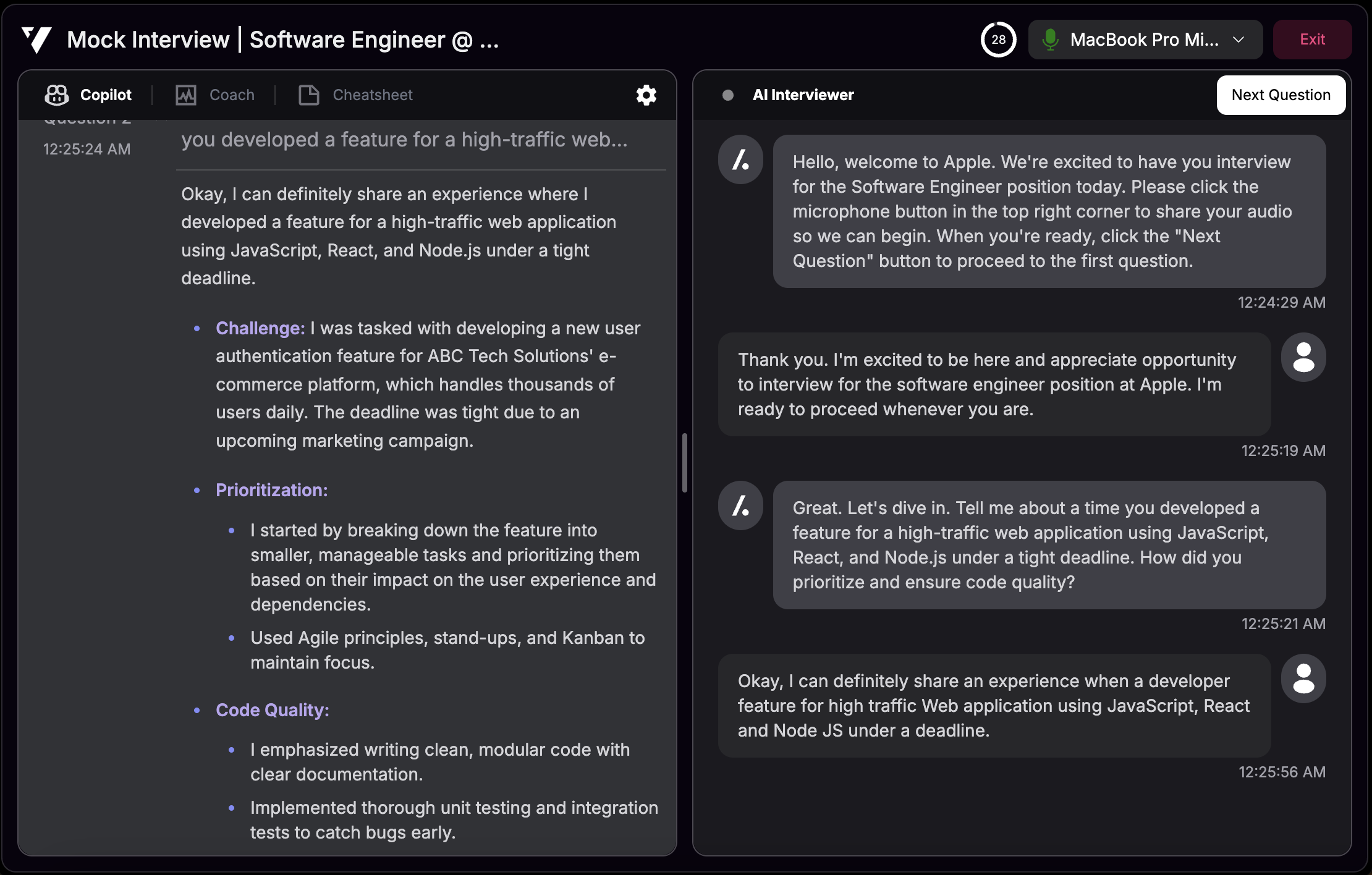 Once your mock interview begins, you'll have access to these features:
### Interactive Mock Interview
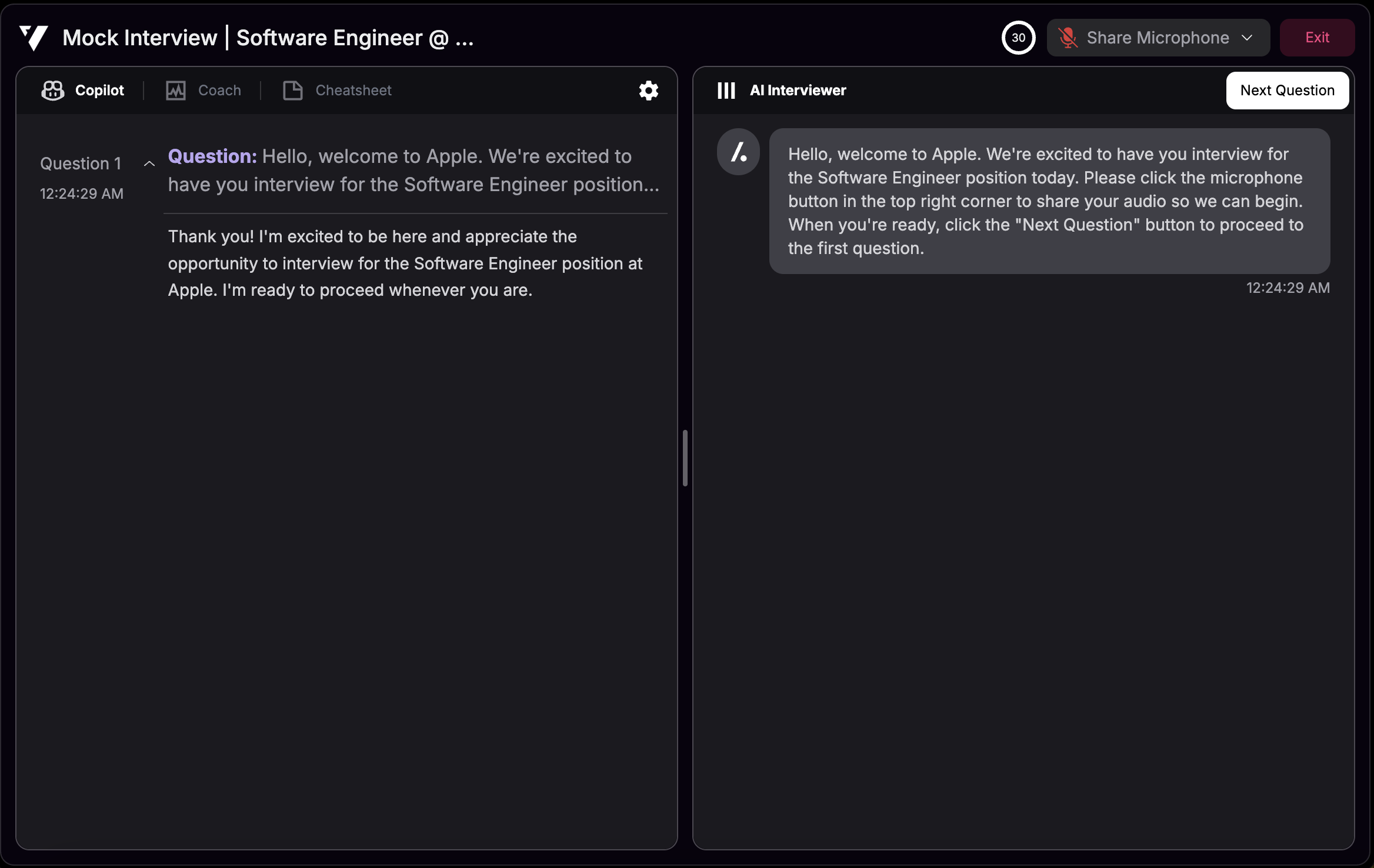
The AI recruiter will ask you questions one at a time. Both the AI's questions and your responses are transcribed and displayed on the transcription pad. When you're ready to move on, click the button to proceed to the next question.
### Optional Camera
Enable your camera for a more immersive interview experience. Your video is **never recorded** - disabling the camera will not affect the quality or effectiveness of your mock interview.
### Interview Copilot Assistance
Interview Copilot is available throughout your session to provide:
* Real-time tips and suggestions
* Feedback on your responses
* Support to enhance your performance
Use Interview Copilot during mock interviews to practice with AI assistance, then try sessions without it to simulate real interview conditions.
***
## Interview Report
After completing your mock interview, you'll receive a detailed performance report with personalized feedback and scoring based on your responses.
Once your mock interview begins, you'll have access to these features:
### Interactive Mock Interview
The AI recruiter will ask you questions one at a time. Both the AI's questions and your responses are transcribed and displayed on the transcription pad. When you're ready to move on, click the button to proceed to the next question.
### Optional Camera
Enable your camera for a more immersive interview experience. Your video is **never recorded** - disabling the camera will not affect the quality or effectiveness of your mock interview.
### Interview Copilot Assistance
Interview Copilot is available throughout your session to provide:
* Real-time tips and suggestions
* Feedback on your responses
* Support to enhance your performance
Use Interview Copilot during mock interviews to practice with AI assistance, then try sessions without it to simulate real interview conditions.
***
## Interview Report
After completing your mock interview, you'll receive a detailed performance report with personalized feedback and scoring based on your responses.